Open source · Free · Runs locally
BlissPoint AI Security
A free, local-first scanner for everything your AI coding agent loads automatically — MCP servers, Agent Skills, memory files — with every finding explained in plain English.
npx @blisspointanalytics/ai-security scan
The problem, in plain English
If you use Claude Code, Claude Desktop, or Cursor, your agent already trusts a growing pile of things without asking you each time: MCP servers (outside tools it can call), Agent Skills (packaged instructions it can follow), and memory files like CLAUDE.md that it reads on every session. Most teams have never seen the full list in one place — and security research keeps finding real, exploitable problems hiding in exactly these things: servers with no authentication, skills bundling malicious scripts, instruction files quietly poisoned to make an agent misbehave persistently.
BlissPoint AI Security inventories all of it on your own machine and tells you exactly what needs attention — in language a manager with no security background can act on, not just a security engineer.
Where to run it, and what happens
Open a terminal in the project you want checked
The folder that holds your agent's configuration — the one with a
.claude/or.cursor/directory, aCLAUDE.md, or an MCP server config. For examplecd ~/code/my-app. You need Node.js installed;npxcomes with it.Run the one command
npx @blisspointanalytics/ai-security scanfetches the scanner the first time and runs it against the current folder. Nothing is installed globally and no account is created.It reads, and only reads
The scanner opens config files and text files and looks at their contents. It never executes, imports or runs anything it finds, never changes a file, and never sends anything off your machine — there is no network call and nothing is recorded anywhere. Run it as often as you like.
Read the output in your terminal
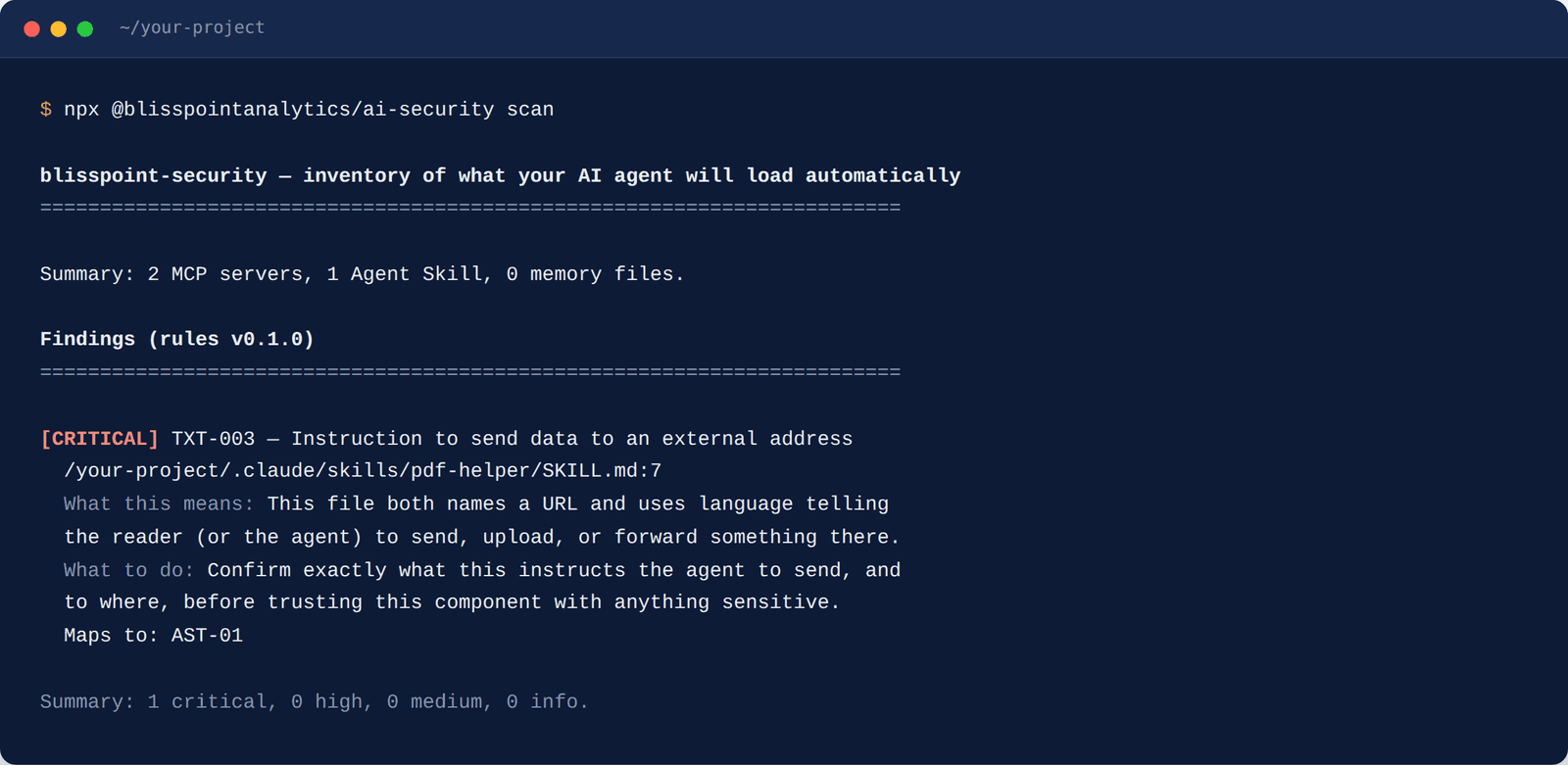
First an inventory — how many MCP servers, skills and memory files it found — then the findings, most severe first. Each one names its rule, the file and line, what this means, and what to do, and maps to a published OWASP category. A clean run says "no known issues found by the current rules" — deliberately not "secure".
Optionally, keep watching
blisspoint-security lockrecords a baseline;scan --verifythen flags anything new, changed or removed since.scan --sarif results.sarifwrites results for GitHub's code-scanning UI, and a ready-made GitHub Action in the repository runs it on every push.
What it actually checks
14 deterministic rules — no LLM involved, no network call, the same result every time on the same input. Every finding maps to the OWASP MCP Top 10 or the OWASP Agentic Skills Top 10, with a plain-English explanation and a concrete fix — never a bare "vulnerability detected". Among them:
Hard-coded secrets
API keys or tokens sitting in an MCP server's config, where every agent session can read them.
Unpinned servers
An MCP server launched without a pinned version — the classic "rug pull" setup where tomorrow's update isn't today's code.
Unauthenticated remotes
A remote MCP server reachable with no visible authentication at all.
Command injection
Shell commands assembled from untrusted input inside a server or skill.
Hidden Unicode
Invisible characters in a skill or memory file — the standard way to smuggle instructions past a human reader.
Data exfiltration instructions
Text telling the agent to send, upload or forward your data to an outside address.
Pipe-to-shell
An instruction to download a script and run it straight away, sight unseen.
Built to be trusted
Deterministic rules, a public benchmark, and findings you can act on in minutes.
Benchmarked, and the benchmark is public
Every rule is scored against a published corpus of real configurations, skills and memory files that ships in the repository — 100% precision and recall on that corpus today, with each new real-world sample folded in as it is found. You can run the benchmark yourself with one command.
Every finding is a decision, not a guess
A finding names its rule, the file and the line, says what it means in plain English, and tells you what to do — ranked most severe first and mapped to the OWASP category it belongs to. Five minutes per finding is the design target, and most take less.
A clean run says exactly what was checked
"No known issues found by the current rules" is a precise statement: these 14 rules, this inventory, this moment. Lock a baseline and every later change to what your agent loads is flagged the instant it appears. The rule set and the tested platforms are listed in the project README.
Free and open source, MIT licensed
Run it on every project, as often as you like, with nothing to sign up for. Security disclosure policy · questions to solutions@blisspointanalytics.com.