
Military to Civilian Resume Translator
The Military to Civilian Resume Translator is a free tool that turns military duties, evaluation bullets, awards and training into civilian resume bullets, a skills list, a civilian job title and a summary, with every acronym explained, 3 times a day with no sign-up.
Translate your military experience
Paste what you did in uniform. In about 20 seconds you get resume lines a civilian recruiter understands, 3 times a day for free, with no sign-up.
Don't paste classified or sensitive information, Social Security or DoD ID numbers, or your home address. We remove those patterns before anything is sent, but leave them out to be safe.
Why translate a military resume?
Most civilian recruiters spend seconds on a resume, and many never served. "NCOIC," "OR rate" and "PCS" read as noise, so a strong record can look thin. Applicant tracking systems, the software that screens resumes first, match the words in the job posting, and postings say "supervisor," "inventory" and "readiness," not your unit's shorthand.
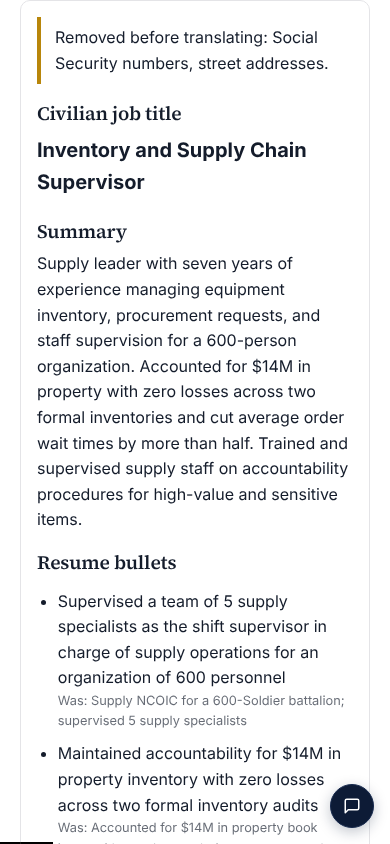
The translator keeps what you did and changes only the words: ranks become roles, acronyms become plain terms, and every duty becomes a results-first bullet. It never adds a number or an achievement you didn't give it.

Example: before and after
Staff Sergeant Jordan Ellis (fictional), Army 91B Wheeled Vehicle Mechanic, 8 years. Civilian title: Fleet Maintenance Supervisor (was "SSG / 91B, Motor Pool NCOIC").
| Military (before) | Civilian (after) |
|---|---|
| Served as NCOIC of BN motor pool; supervised 12 Soldiers across 3 shifts IAW AR 750-1 | Supervised 12 mechanics across 3 shifts in a vehicle maintenance shop, following federal maintenance standards |
| Maintained 85 TWVs at 96% OR rate during NTC rotation | Kept a fleet of 85 trucks and utility vehicles 96% ready for use during a month-long field exercise |
| Managed PLL and $1.2M in Class IX parts via GCSS-Army | Managed a $1.2 million parts inventory in an SAP-based inventory system |
| Awarded ARCOM for zero safety incidents during PCS of unit equipment | Received a commendation medal for a move of the unit's equipment with zero safety incidents |
Skills: Fleet maintenance, Preventive maintenance, Team supervision, Inventory control, SAP, Safety compliance, Diesel engines.
How to use the translator
Paste your military experience
Your job title and MOS, AFSC, rating or designator, plus duties, evaluation bullets, awards and training. Leave out anything classified, your Social Security and DoD ID numbers, and your address.
Pick a target role, or let it suggest
Type the civilian job you want, or leave it blank: the translator suggests roles that fit and links to the official O*NET military crosswalk for your code.
Check the civilian version
You get a civilian job title, a summary, one plain-English bullet per duty, a skills list and a glossary of every term it translated. Numbers come only from what you pasted.
Build the full resume
One tap opens the free resume builder on BlissPoint Access, filled in. Add your name, contact details and education, pick a layout and download the PDF.
After the translation

- Free resume builder: Build the full resume opens it filled in; add contact details and education, then download a PDF.
- Job search scores your match with each posting.
- Aiva tailors your resume and cover letter to every job and tracks your applications, from $10 a month (adults 18+).
- My Next Move for Veterans: the Department of Labor's O*NET military crosswalk.
- Military to civilian job translator: every civilian occupation linked to your MOS, rating or AFSC, the ASVAB career crosswalk and the military-to-civilian career hub.
Questions
What does a military to civilian resume translator do?
It rewrites military duties, evaluation bullets, awards and training in words a civilian hiring manager knows: ranks become roles, acronyms become plain terms, and each duty becomes a results-first resume bullet. This one also writes a civilian job title, a summary, a skills list and a glossary of what it changed.
Is it free?
Yes: 3 translations a day, with no sign-up and no email. If you want help with every application after that, Aiva on BlissPoint Access tailors your resume and cover letter to each job, from $10 a month.
Will it make up numbers or achievements?
No. It keeps numbers you gave it exactly, and any bullet with a number that isn't in what you pasted is dropped before you see it. If your input has no numbers, the bullets have none. Check every line before you use it.
Is it safe to paste my evaluation bullets?
Don't paste classified or controlled information, Social Security or DoD ID numbers, or your home address. Before anything is sent for translation, the tool removes Social Security and DoD ID numbers, emails, phone numbers, street addresses and any line with a classification marking. Your text isn't saved after the translation.
How does it find civilian jobs for my MOS, AFSC or rating?
It suggests 3 to 5 civilian roles that fit what you described and links your code to the O*NET military crosswalk (My Next Move for Veterans), the U.S. Department of Labor's official list of civilian occupations for each military job.
How do I turn this into a full resume?
Tap Build the full resume. The free resume builder on blisspointaccess.com (our sister company, BlissPoint Access) opens with your title, summary, bullets and skills filled in. The link works once, for 30 minutes, and carries only a random code, never your details.
Does it work for every branch?
Yes: Army, Marine Corps, Navy, Air Force, Space Force, Coast Guard, and the Guard and Reserve. Paste your MOS, AFSC, rating or designator and the translator handles that branch's terms.
Is this an official military or VA tool?
BlissPoint Analytics is not affiliated with or endorsed by the U.S. Department of Defense, any military branch or the Department of Veterans Affairs.
BlissPoint Analytics is not affiliated with or endorsed by the U.S. Department of Defense, any military branch or the Department of Veterans Affairs.