
9-box calibration linked to succession
9-box calibration is an Organization Viewer tool that places a manager's team or a department on performance against potential, linked to succession readiness, with a note on rater bias.
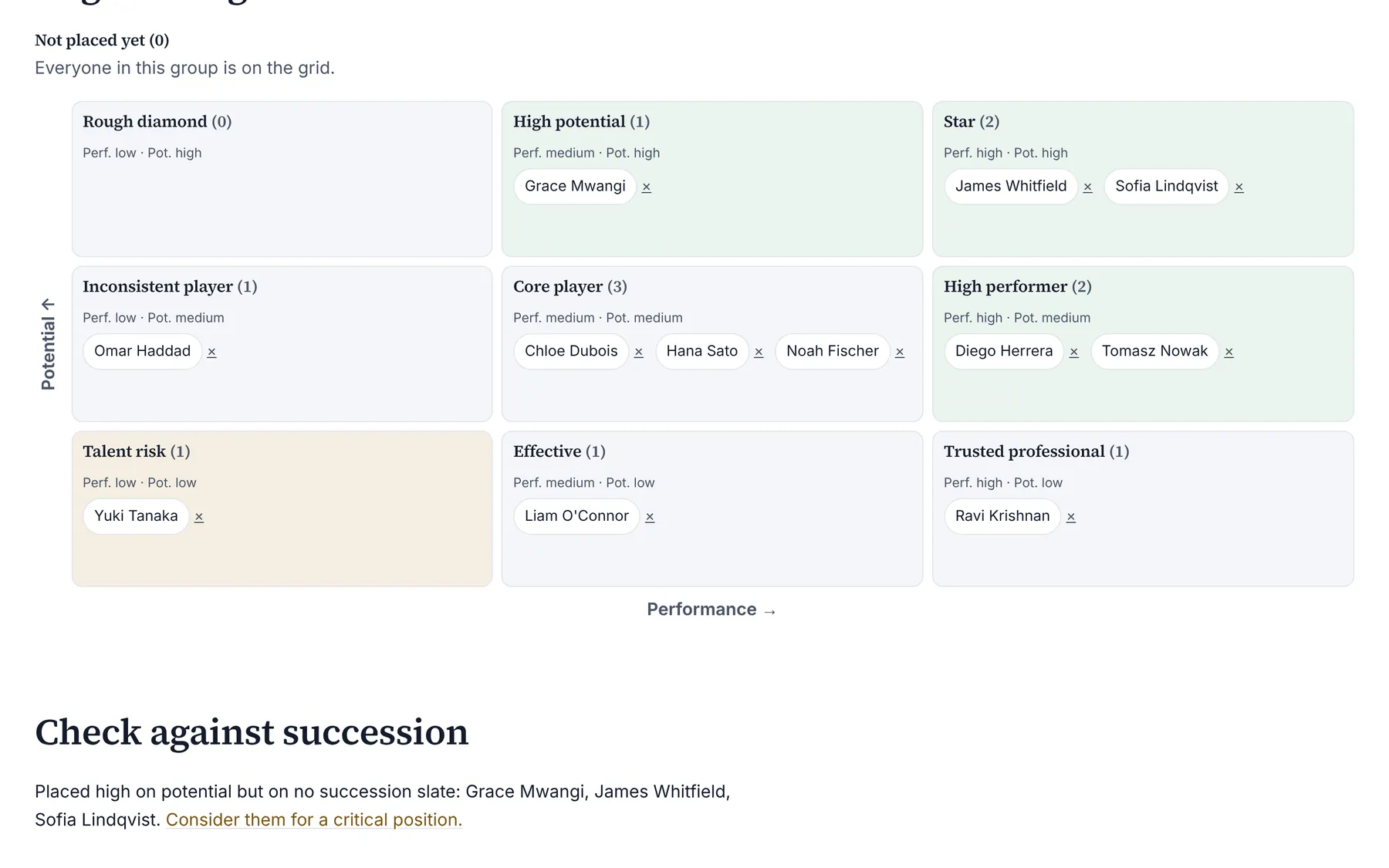
The 9-box grid places each person on performance (low, medium or high) against potential (low, medium or high). Organization Viewer builds the group from your org chart: everyone below a manager, or one department.
Each name shows its readiness from succession plans, so the grid and the slates can be checked against each other.
Who is this for?
- Leadership teamsYou’ll use it to run a talent review on the real org chart.
- HR business partnersYou’ll use it to check succession slates against how leaders see their people.
Watch how it works
A 1:09 walkthrough with English captions and a transcript. The full written guide is in the help center.
Transcript (1:09 video, captions in English)
- How to: calibrate a team on the 9-box grid
- WHAT IT'S FOR: Place people on performance against potential, and compare with succession
- What you need first. Managers on the org chart. Ideally, a closed review cycle
- STEP 1: Open Calibration, choose a team or department, Show
- STEP 2: Read the rater-bias note. Each manager places their own people first
- STEP 3: Select a name, then Place here on a box. Or drag the name onto a box
- STEP 4: Check the placement
- STEP 5: Read Check against succession. High potential but on no slate, or Ready now but placed low
- RATER BIAS: Watch for halo, leniency and recency. Potential is a judgment: not on its own for pay or exits
- Summary. Choose the team. Place each person. Compare with succession
- Full guide: blisspointanalytics.com/help/calibration-9-box
What it does
- Drag a name onto a box, or select it and press Place here; both work with a keyboard.
- Succession readiness (ready now, in 1 to 2 years, development needed) on every name.
- Prompts where they disagree: high potential but on no slate, or ready now but placed low.
- A rater bias note on the page: rate independently first, then discuss; watch for halo, leniency, central tendency, recency and similar-to-me errors.
What it costs: Included on every Organization Viewer plan, including Free for up to 50 people. Paid plans start at $300 a month for 51 to 250 people. See pricing.
How it works, step by step
- Open Calibration and choose a manager's team or a department.
- Each manager places their own people before the meeting.
- Discuss the differences using evidence from goals and reviews, then adjust.
Feature details
Who sees what
- A manager sees and places the people below them on the chart. Owners and admins see any team or department.
- Every placement change is recorded in the company's activity log.
- Potential is a judgment rather than a measurement; use the grid for development and succession conversations, not on its own for pay or exits.
Questions
What do the axes mean?
Performance is what the person delivered this period. Potential is how much larger a role they could grow into.
Can I use it without a mouse?
Yes. Press a name to select it, then press Place here on a box.
How does it link to succession?
Readiness from the succession plans shows on each name, and the page lists where the grid and the slates disagree.
Learn more
Help articles
Related consulting
Related features
- Pay transparency tracker
- AI hiring tool inventory
- Manager and 360 surveys
- Headcount budget planner
- Directory sync and chat alerts
- Attrition analytics
- Pay equity analysis
- Hiring funnel analytics
- Engagement survey analysis
- AI hiring bias audit calculations
- Booking and review requests
- Structured interview scorecards
- Job analysis wizard
- Onboarding plans
- Adverse-impact checker
- Requisitions
- Offer and pay-range check
- Goals and check-ins
- Review cycles
- Team health dashboard
- Workforce analytics tools
Start with the sample, or with your own org
Sign-in is a one-time email link, with no password and no credit card. Load the fictional sample company to see every feature working before you enter real data.