
Headcount budget planner: salary cost from your workforce plan
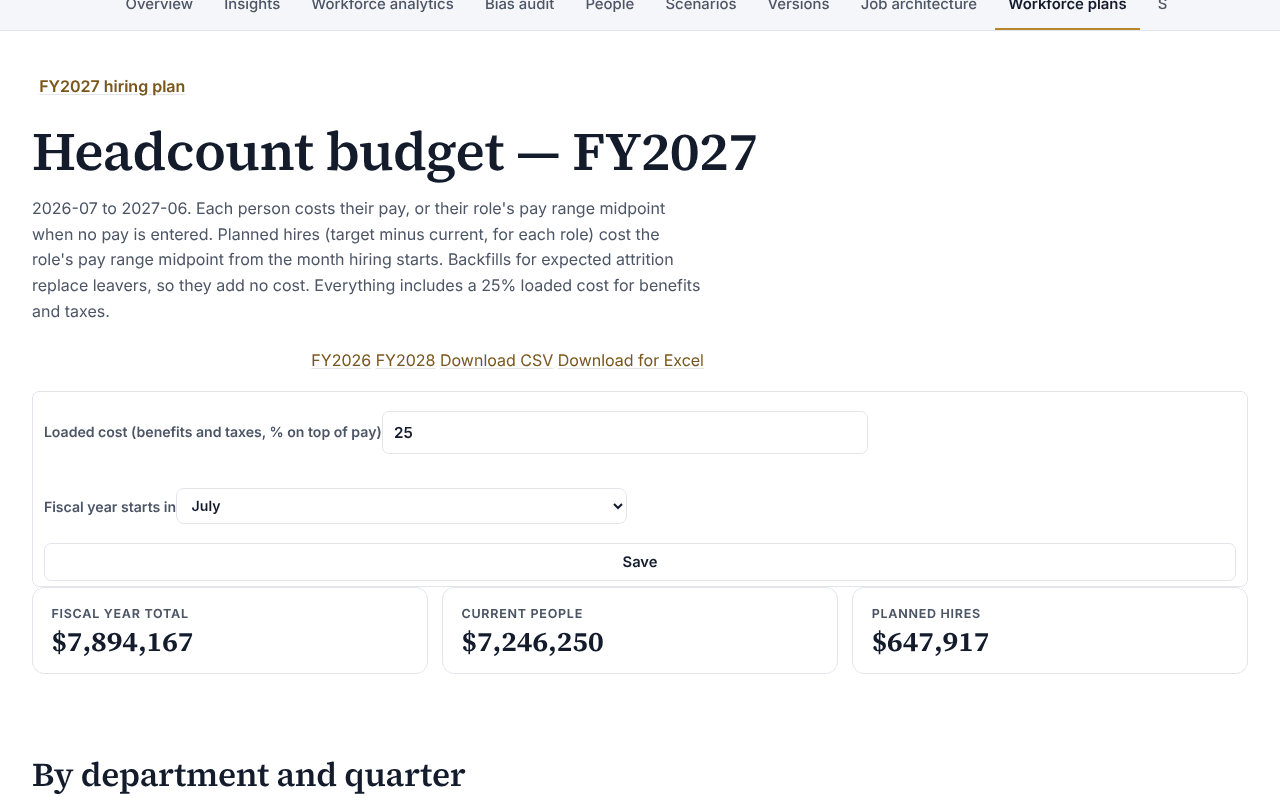
The headcount budget planner is an Organization Viewer tool that turns a workforce plan into salary cost by department, month and quarter for a fiscal year.
A headcount plan says how many people each role needs; a budget says what that costs. The headcount budget in Organization Viewer turns a workforce plan into salary cost by department, month and quarter for a fiscal year, from the pay already on your org chart.
It is built from pay, so it appears only for members allowed to see compensation. Anyone else sees no figures at all, not even department totals.
Who is this for?
- HR and finance partnersYou’ll use it to agree a salary budget from the same org chart and hiring plan, not a rebuilt spreadsheet.
- Founders and department headsYou’ll use it to see what next year's hiring plan costs by month before you commit to it.
- Teams planning a reorganizationYou’ll use it to compare the plan's cost on today's chart and on a draft chart, by department.
What it does
- Costs each person on the live org chart at their pay, or at their role's pay range midpoint when no pay is entered.
- Costs planned hires (each role's target minus its current headcount) at the role's pay range midpoint, from the month hiring starts.
- Adds a loaded cost: the percentage you set for benefits and taxes on top of pay, 25% to start.
- Totals by department, month and quarter, and moves between fiscal years.
- Compares the same plan's cost on a draft org chart (a scenario), by department.
- Downloads as CSV, or as a CSV for Excel.
What it costs: Included on every Organization Viewer plan, including Free for up to 50 people. Paid plans start at $300 a month for 51 to 250 people. See pricing.
How it works, step by step
- Open a workforce plan and choose Headcount budget.
- Set the loaded cost and the month your fiscal year starts.
- Set when hiring starts for each role with planned hires.
- Read totals by department, month and quarter, and compare with a scenario if you have one.
- Download CSV, or Download for Excel, and send it to finance.
Feature details
How the cost is worked out
- Midpoint costing: a role's pay range midpoint is the average of its minimum and maximum; with only one end set, that end is used.
- Proration by whole months: a hire starting in the fourth month of the fiscal year costs nine months.
- Backfills for expected attrition replace people who leave at similar pay, so they add no cost.
- Loaded cost: everything is multiplied by 1 plus the loaded cost percentage, which can be set from 0% to 200%.
- People and planned hires with no pay and no pay range are counted and left out of the totals, and the export says how many.
Fiscal years and exports
- The fiscal year is named for the calendar year it ends in: FY2027 with a July start runs July 2026 to June 2027.
- The CSV has every department by month and quarter, current people and planned hires, and the comparison with a draft when you chose one.
- Download for Excel is the same file with a marker Excel needs to read accented names. Text a spreadsheet would treat as a formula is written as plain text.
Who sees figures
- Only members allowed to see compensation see the budget. For anyone else no figure is computed or sent, not even department totals.
Choosing a loaded cost finance will sign
The free whitepaper Headcount planning that finance trusts works out fully loaded cost per head from BLS employer cost data, explains why paid leave should not be counted twice, and walks through scenarios and approvals for a plan costed the way this planner does it.
When a plan line is approved, its planned hires open as requisitions with the budget frozen, and each offer gets an offer and pay-range check.
Questions
How are planned hires costed?
At the role's pay range midpoint, multiplied by the loaded cost, from the month hiring starts for that role. A hire starting in the fourth month of the fiscal year costs nine months.
What is the loaded cost?
The percentage you set for benefits and taxes on top of pay. It starts at 25% and can be set from 0% to 200%.
How is the fiscal year named?
For the calendar year it ends in. FY2027 with a July start runs July 2026 to June 2027.
Who can see the budget?
Only members allowed to see compensation. For anyone else nothing is computed or sent, not even department totals.
Learn more
Help articles
Related consulting
Related features
- Pay transparency tracker
- AI hiring tool inventory
- Manager and 360 surveys
- Directory sync and chat alerts
- Attrition analytics
- Pay equity analysis
- Hiring funnel analytics
- Engagement survey analysis
- AI hiring bias audit calculations
- Booking and review requests
- Structured interview scorecards
- Job analysis wizard
- Onboarding plans
- Adverse-impact checker
- Requisitions
- Offer and pay-range check
- Goals and check-ins
- Review cycles
- 9-box calibration
- Team health dashboard
- Workforce analytics tools
Start with the sample, or with your own org
Sign-in is a one-time email link, with no password and no credit card. Load the fictional sample company to see every feature working before you enter real data.