
Job analysis wizard
The job analysis wizard is an Organization Viewer tool that rates a role's O*NET tasks for importance and frequency, picks the knowledge, skills and abilities it needs, and saves a dated record that drafts the job description and interview questions.
A job analysis writes down what a job actually involves before you decide how to hire for it. The Uniform Guidelines on Employee Selection Procedures (29 CFR 1607.14) expect selection procedures to rest on a review of the job.
The wizard starts from O*NET's data for the role's occupation, so you rate real tasks rather than starting from a blank page, and every output traces back to the rated work. General information, not legal advice.
Who is this for?
- HR teamsYou’ll use it to write job descriptions and interview questions that trace back to the actual work.
- Hiring managersYou’ll use it to agree what matters in the role before the first interview.
- Compliance-minded employersYou’ll use it to keep a dated record of what each hiring decision was based on.
Watch how it works
A 1:45 walkthrough with English captions and a transcript. The full written guide is in the help center.
Transcript (1:45 video, captions in English)
- How to: run a job analysis
- WHAT IT'S FOR: Write down what the job involves before deciding how to hire for it
- What you need first. A role in Job architecture. Ideally linked to an O*NET occupation. Editor, admin or owner access
- STEP 1: Choose the Role, then Analyze this role. Under 1. Job analysis on the Hiring tools page
- STEP 2: Tick the tasks the job really involves. Add any missing ones with Add task
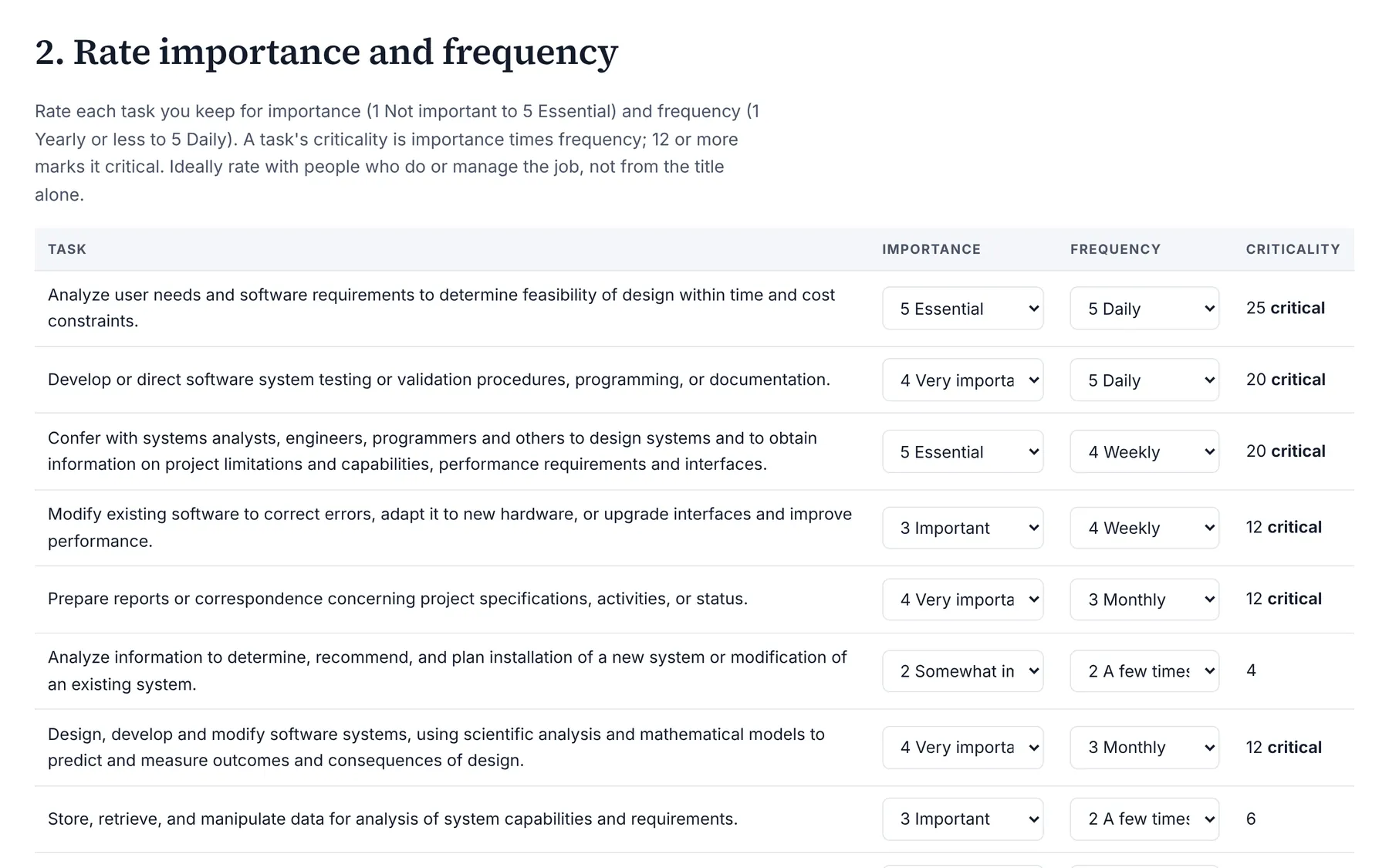
- STEP 3: Rate Importance and Frequency. Importance × frequency of 12 or more marks a task critical
- STEP 4: Keep the knowledge, skills and abilities. Needed on day one. In Notes, write who rated and how
- STEP 5: Select Save dated analysis. The record can't be edited, only replaced by a newer one
- STEP 6: Select Send to hiring kit. Then review and publish the drafts in the hiring kit
- THE SCIENCE: Rate with people who do or manage the job. Not from the title alone. General information, not legal advice
- Summary. Tick and rate the real tasks. Choose the day-one KSAs. Save, then send to the hiring kit
- Full guide: blisspointanalytics.com/help/job-analysis
What it does
- Starts from a role in your job architecture, or from any O*NET occupation.
- Lists the occupation's O*NET tasks with core tasks checked; add your own.
- Rates each task for importance and frequency from 1 to 5. Importance times frequency is its criticality; 12 or more marks it critical.
- Offers the occupation's most important O*NET knowledge, skills and abilities to choose from.
- Saves a dated record with who rated it, the O*NET release and the pay reference. Records can't be edited, only replaced by a newer one.
- Drafts the job description (critical tasks as responsibilities), interview questions for the chosen skills and critical tasks, and a pay reference from the role's range and the BLS median.
What it costs: Included on every Organization Viewer plan, including Free for up to 50 people. Paid plans start at $300 a month for 51 to 250 people. See pricing.
How it works, step by step
- Open Hiring tools and pick a role, or search O*NET for an occupation.
- Keep the tasks the job really involves and add any that are missing.
- Rate each task for importance and frequency, ideally with people who do or manage the job.
- Choose the knowledge, skills and abilities needed on day one, and save.
- Send the result to the role's hiring kit as drafts, then publish them there.
Feature details
What the record holds
- Every task with its importance, frequency and criticality, marked as O*NET or added.
- The chosen knowledge, skills and abilities with O*NET's importance rating.
- The analyst, the date and time, the O*NET-SOC code and release, and a method version.
- The pay reference at the time: the role's range (shown only to people allowed to see pay) and the U.S. median wage from BLS.
Questions
Can a saved analysis be changed?
No. It is a dated record. A newer analysis for the same role becomes the current one, and the older one stays on file.
Where does the task list come from?
From O*NET, the U.S. Department of Labor's occupation database, for the occupation the role is linked to. You can add tasks of your own.
Does this make my hiring process compliant?
No tool can. It helps you keep the kind of record the Uniform Guidelines describe. General information, not legal advice.
Learn more
Help articles
Related consulting
Related features
- Pay transparency tracker
- AI hiring tool inventory
- Manager and 360 surveys
- Headcount budget planner
- Directory sync and chat alerts
- Attrition analytics
- Pay equity analysis
- Hiring funnel analytics
- Engagement survey analysis
- AI hiring bias audit calculations
- Booking and review requests
- Structured interview scorecards
- Onboarding plans
- Adverse-impact checker
- Requisitions
- Offer and pay-range check
- Goals and check-ins
- Review cycles
- 9-box calibration
- Team health dashboard
- Workforce analytics tools
Start with the sample, or with your own org
Sign-in is a one-time email link, with no password and no credit card. Load the fictional sample company to see every feature working before you enter real data.