
Structured interview scorecards
Structured interview scorecards are an Organization Viewer tool where each interviewer rates a candidate on anchored 1-to-5 scales on their own, then sees the panel's combined score and where they disagree.
A structured interview asks every candidate the same job-related questions and scores each answer against the same written standard. I-O psychology research has long found this predicts job performance better than an unstructured conversation.
Organization Viewer's scorecards take their questions from the role's hiring kit, give each one a behaviorally anchored rating scale, keep each interviewer's ratings private until they submit, and then show the panel where it agrees and where it doesn't.
Who is this for?
- Hiring managersYou’ll use it to get every interviewer scoring the same evidence the same way, and spot disagreements before deciding.
- HR and talent teamsYou’ll use it to keep a record of independent ratings that shows how each decision was reached.
- Small teamsYou’ll use it to give a two-person panel the same structure as a large one, with no extra software.
Watch how it works
A 1:36 walkthrough with English captions and a transcript. The full written guide is in the help center.
Transcript (1:36 video, captions in English)
- How to: use interview scorecards
- WHAT IT'S FOR: The same questions for every candidate, each with anchors for a 1, a 3 and a 5
- What you need first. A role with a hiring kit. Editors create scorecards. Any member can rate
- STEP 1: In New scorecard, choose Role and Candidate. Roles with a published interview guide are listed first
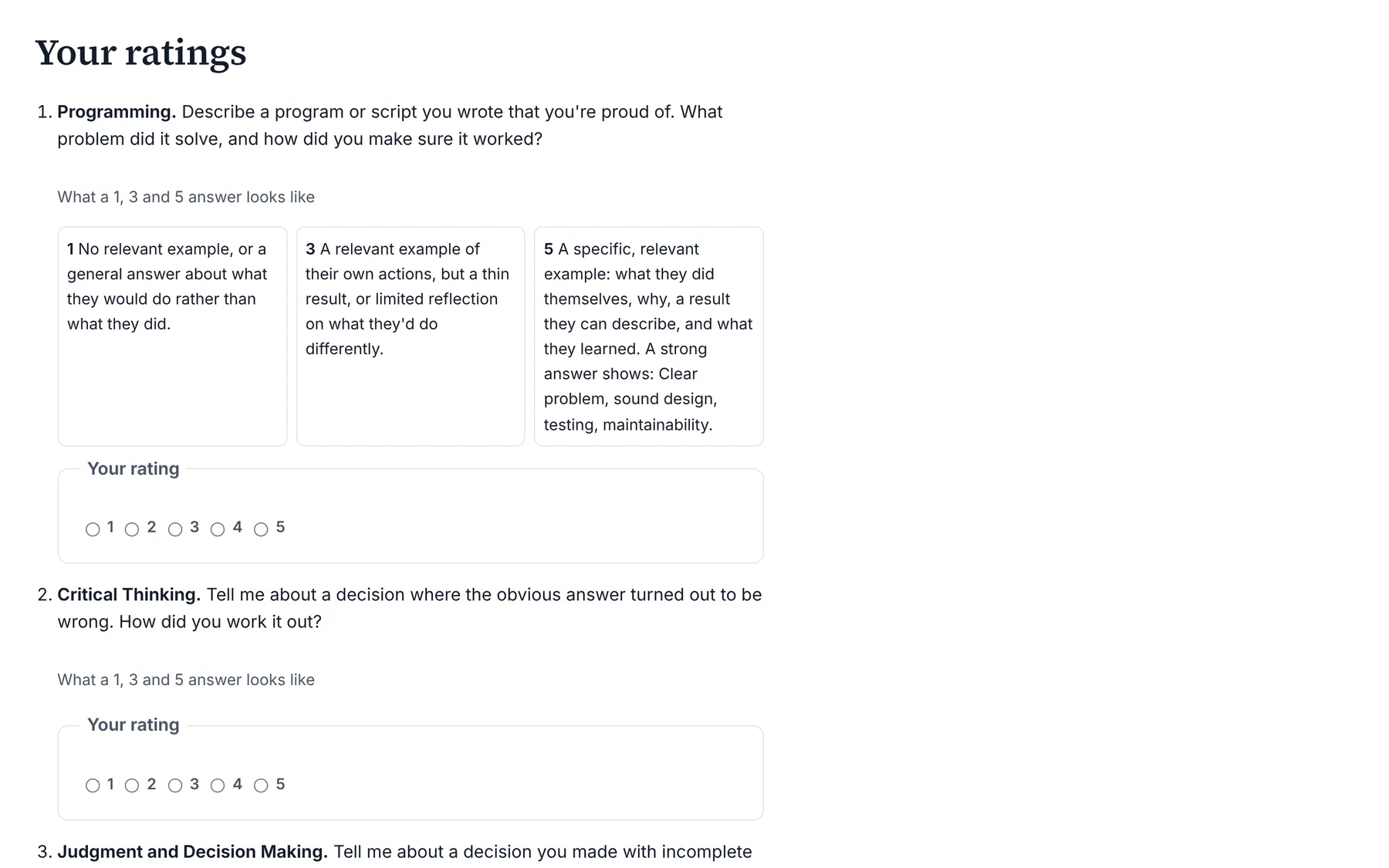
- STEP 2: Check the questions and anchors. Under What a 1, 3 and 5 answer looks like
- STEP 3: Pick Your rating for each question. Open the anchors for each; other ratings stay hidden
- STEP 4: Write your notes, then Submit my ratings. Evidence you heard, not impressions
- STEP 5: Read the Combined score. A spread of 2 or more is marked Discuss
- STEP 6: Start discussion and lock ratings. Needs at least two submitted ratings
- THE SCIENCE: Rate alone first, then compare. Seeing a colleague's score pulls yours toward it
- Summary. One scorecard per candidate. Rate alone, then submit. Discuss the flagged questions
- Full guide: blisspointanalytics.com/help/interview-scorecards
What it does
- Pre-fills each question with a behaviorally anchored rating scale (BARS): what a 1, a 3 and a 5 answer looks like. Editors can rewrite the anchors before anyone submits.
- Each interviewer rates on their own and can save a draft. No one sees another interviewer's ratings until they have submitted their own.
- After submitting, the interviewer sees the mean per question, per competency and overall, and the spread between interviewers.
- Flags every question where the highest and lowest rating are 2 or more points apart, so the panel discusses it.
- Starting the discussion locks every rating, so the record shows what each person thought on their own.
What it costs: Included on every Organization Viewer plan, including Free for up to 50 people. Paid plans start at $300 a month for 51 to 250 people. See pricing.
How it works, step by step
- Write or publish the interview questions in the role's hiring kit, or send them there from a job analysis.
- Open Hiring tools, choose the role, enter the candidate and create the scorecard.
- Each interviewer opens the scorecard after the interview, rates every question against its anchors and submits.
- Once at least two have submitted, an editor starts the discussion. Ratings lock, and the flagged questions are the agenda.
Feature details
The science behind it, in plain words
- Anchors describe behavior, so a 4 means the same thing from every interviewer.
- Independent ratings come first because seeing a colleague's score pulls your own toward it.
- The overall score is the mean of the competency means, so a competency with more questions doesn't count for more.
- To check outcomes for adverse impact, the bias audit applies the four-fifths rule of thumb from the Uniform Guidelines (29 CFR 1607.4(D)). If an automated tool scores candidates, see the AI hiring tool inventory for NYC Local Law 144. General information, not legal advice.
Questions
Can an interviewer see the others' scores before rating?
No. Other interviewers' ratings and the combined score appear only after you submit your own, or once the panel discussion has started.
What counts as a large disagreement?
A spread of 2 or more points between the highest and lowest rating on one question.
Can ratings change after the discussion?
No. Starting the discussion locks every rating, and a submitted rating can't be changed at any point.
Where do the questions come from?
From the role's hiring kit: behavioral questions for the occupation's most important O*NET skills and its core tasks, which you can edit.
Learn more
Help articles
Related consulting
Related features
- Pay transparency tracker
- AI hiring tool inventory
- Manager and 360 surveys
- Headcount budget planner
- Directory sync and chat alerts
- Attrition analytics
- Pay equity analysis
- Hiring funnel analytics
- Engagement survey analysis
- AI hiring bias audit calculations
- Booking and review requests
- Job analysis wizard
- Onboarding plans
- Adverse-impact checker
- Requisitions
- Offer and pay-range check
- Goals and check-ins
- Review cycles
- 9-box calibration
- Team health dashboard
- Workforce analytics tools
Start with the sample, or with your own org
Sign-in is a one-time email link, with no password and no credit card. Load the fictional sample company to see every feature working before you enter real data.