
Requisitions linked to your headcount plan
Requisitions are an Organization Viewer tool that opens approved planned hires from a workforce plan, tracks them to filled and puts the new person on the org chart.
A requisition is permission to hire one person. In Organization Viewer each one comes from an approved line in a workforce plan, or is drafted as a backfill when someone leaves the org chart, so hiring and the plan stay one record.
When a requisition is filled, the person joins the org chart in the planned role and the plan line counts them.
Who is this for?
- HR and finance partnersYou’ll use it to hire against the approved plan and budget, and see when an offer runs over.
- Hiring managersYou’ll use it to keep a role's budget, pay range, hiring kit and status in one place.
- People operationsYou’ll use it to have the org chart update in the planned seat when a hire is made.
Watch how it works
A 1:44 walkthrough with English captions and a transcript. The full written guide is in the help center.
Transcript (1:44 video, captions in English)
- How to: open and track requisitions
- WHAT IT'S FOR: A requisition is one approved planned hire, with a frozen budget and pay range
- What you need first. A role, ideally with a pay range. A workforce plan with a target. An owner or admin to approve the line
- STEP 1: Approve for hiring on the plan line. In Workforce plans and budget; owners and admins
- STEP 2: Select Open requisition. Choose the Hiring manager and, optionally, a Recruiter
- STEP 3: Use the Status buttons as the search moves. Move to Interviewing, then Move to Offer
- STEP 4: Choose the Work location for this job. See which posting laws apply. Not legal advice
- STEP 5: Mark filled with the Name of the person hired. They join the live org chart in the planned seat
- STEP 6: Find them on the org chart
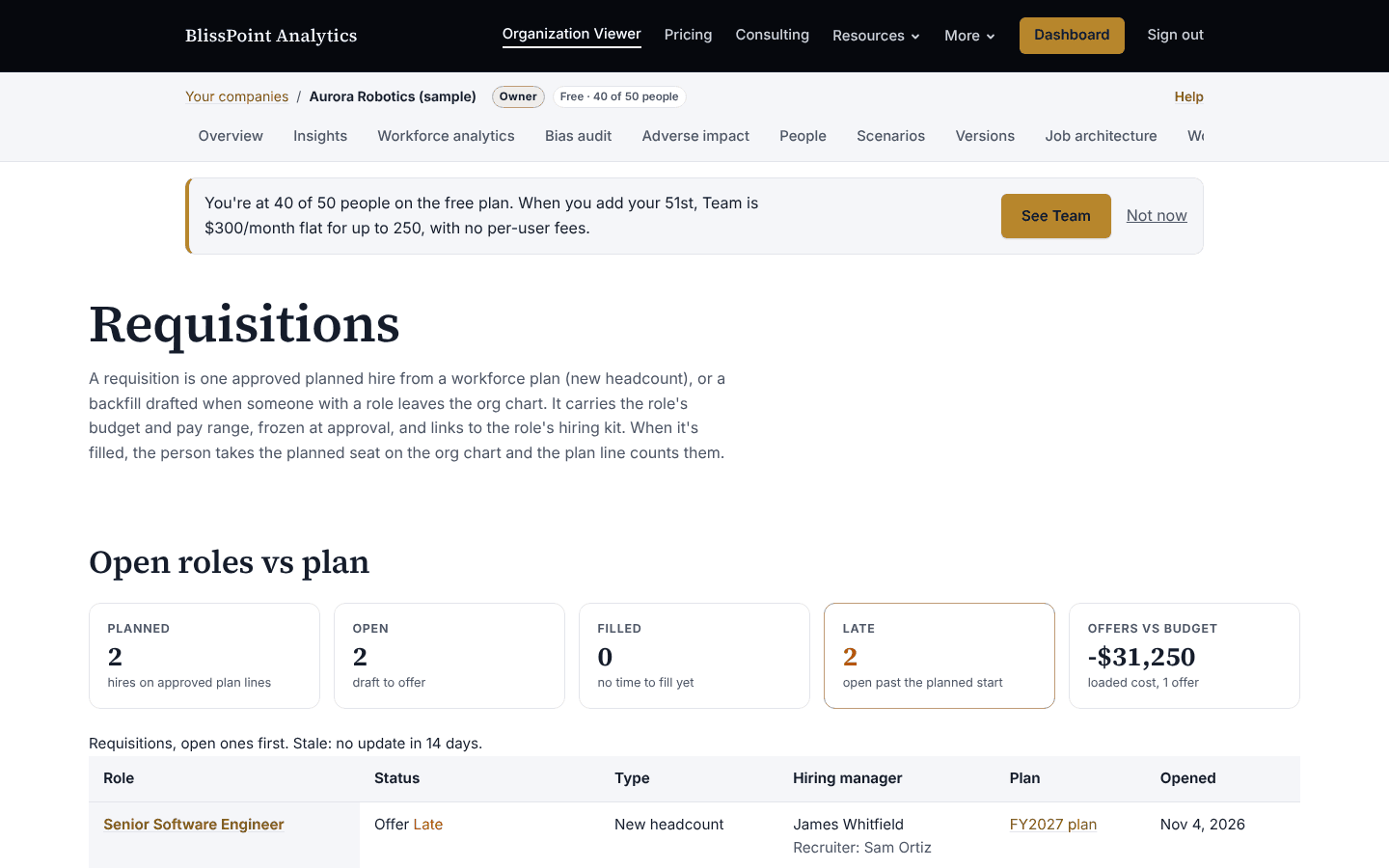
- STALE AND LATE: Stale: no update in 14 days. Late: still open past the planned start date
- Summary. Approve the plan line. Open and track the requisition. Mark filled: they join the chart
- Full guide: blisspointanalytics.com/help/requisitions
What it does
- Owners and admins approve a plan line for hiring, which freezes the role's pay range and the budget per hire.
- Opens one planned hire at a time, with a hiring manager from the org chart and an optional recruiter.
- Tracks status: draft, open, interviewing, offer, filled, on hold or canceled. On hold and canceled give the hire back to the plan.
- Shows a change to the range or budget since approval, and asks for approval again.
- Flags requisitions with no update in 14 days, and those past the planned start.
- Reports planned, open, filled and late, with median time to fill and offers against budget.
- Links each requisition to the role's hiring kit, and logs every change.
What it costs: Included on every Organization Viewer plan, including Free for up to 50 people. Paid plans start at $300 a month for 51 to 250 people. See pricing.
How it works, step by step
- Open a workforce plan and approve a line for hiring.
- Choose Open requisition on that line and pick the hiring manager.
- Move it through interviewing and offer as the search goes.
- Mark it filled with the name of the person hired.
Feature details
Who sees pay
- Budget, pay range and offer figures are shown only to owners, admins, members with pay access, the requisition's hiring manager and anyone named as an extra pay viewer.
Not yet
- There is no applicant tracking system connection yet; statuses are set by hand. Each requisition has a field for an ATS id for later.
Questions
Where do requisitions come from?
From a workforce plan line an owner or admin has approved, one planned hire at a time, or as a draft backfill when someone with a role is removed from the org chart.
What happens when it is filled?
The person is added to the live org chart in the planned role and department, and the plan line counts them. Filling twice adds no one.
What if the pay range changes after approval?
Open requisitions keep the approved figures, the change is shown against them, and the line needs approving again before more open.
Does it connect to an applicant tracking system?
Not yet. Statuses are set by hand for now.
Learn more
Help articles
Related consulting
Related features
- Pay transparency tracker
- AI hiring tool inventory
- Manager and 360 surveys
- Headcount budget planner
- Directory sync and chat alerts
- Attrition analytics
- Pay equity analysis
- Hiring funnel analytics
- Engagement survey analysis
- AI hiring bias audit calculations
- Booking and review requests
- Structured interview scorecards
- Job analysis wizard
- Onboarding plans
- Adverse-impact checker
- Offer and pay-range check
- Goals and check-ins
- Review cycles
- 9-box calibration
- Team health dashboard
- Workforce analytics tools
Start with the sample, or with your own org
Sign-in is a one-time email link, with no password and no credit card. Load the fictional sample company to see every feature working before you enter real data.