
Hiring funnel analytics from your applicant-tracking export
Hiring funnel analytics is an Organization Viewer tool that turns an applicant-tracking export into stage conversion and drop-off, time to hire, offer acceptance, source quality and an adverse-impact check at every stage.
Most applicant-tracking systems can export each candidate with the dates they reached each stage. Organization Viewer reads that export and shows where candidates drop out, how long hiring takes, which sources lead to hires and whether any stage selects one group at a much lower rate.
The adverse-impact figures are screening checks, not legal conclusions. General information, not legal advice. If a result concerns you, consult counsel.
Who is this for?
- Talent acquisition leadsYou’ll use it to find the stage that loses the most candidates and how long each stage takes.
- Recruiting operationsYou’ll use it to compare sources by the hires they produce, not only by applicant volume.
- HR and compliance teamsYou’ll use it to check every hiring stage for adverse impact from the same data.
What it does
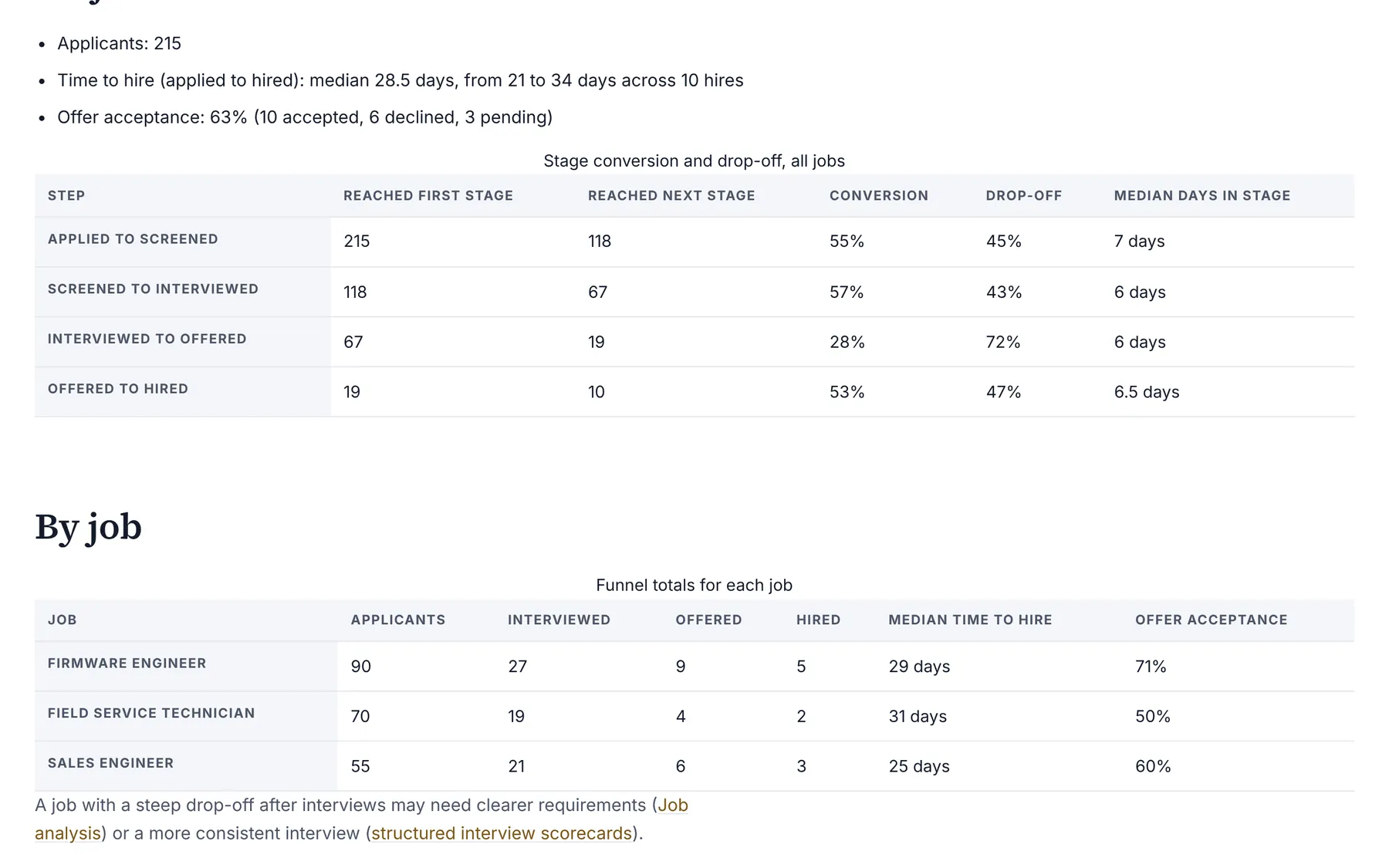
- Counts how many applicants reached each stage: applied, screened, interviewed, offered and hired. Someone with a later date counts as having passed the earlier stages.
- Shows conversion from each stage to the next (reached the next stage divided by reached this one) and the drop-off.
- Reports median time to hire in calendar days, from applied to hired, with the fewest and most days, and the median days spent between stages.
- Works out offer acceptance as hires divided by hires plus declined offers, leaving pending offers out.
- Compares sources by applicants, interviews, offers, hires and hire rate, and marks a source with fewer than 5 applicants as a small sample.
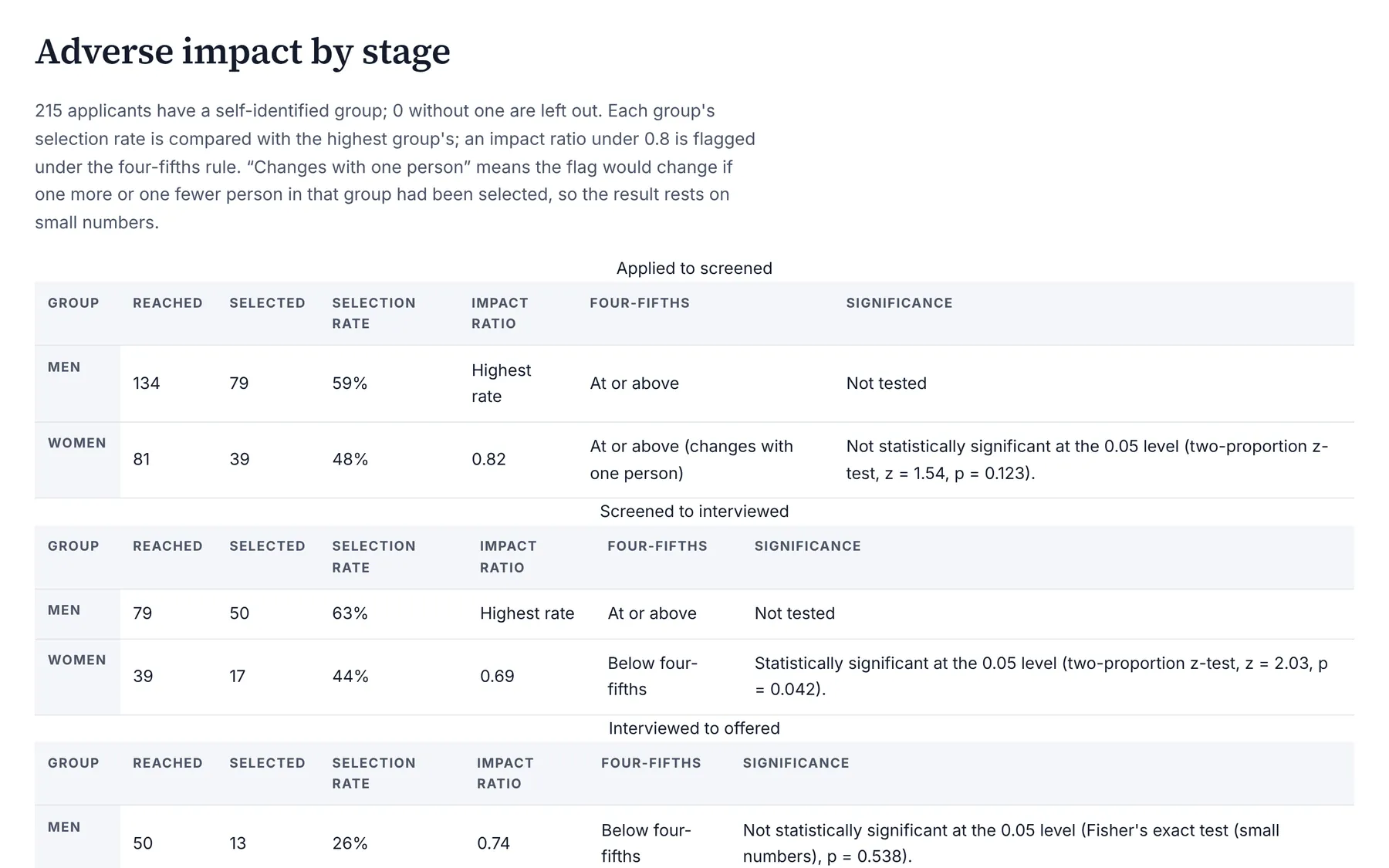
- Runs the adverse-impact checker at every stage (selection rates, impact ratios against the highest-rate group, the four-fifths rule and a significance test) and says when one person more or fewer would change the result. Groups under 5 people are hidden.
What it costs: Included on every Organization Viewer plan, including Free for up to 50 people. Paid plans start at $300 a month for 51 to 250 people. See pricing.
How it works, step by step
- Export candidates from your applicant-tracking system with Candidate ID, Job, Source, Group and a date column per stage, or start from the template on the page.
- Open Hiring funnel in your company and import the CSV.
- Read conversion, time to hire, offer acceptance and source quality for all jobs or one job.
- Review the adverse-impact table for each stage and the one-person check beside it.
Feature details
Definitions
- One applicant is one person applying to one job.
- An offer-declined date counts as reaching the offer stage.
- Median is the middle value, or the mean of the two middle values for an even count.
- The one-person check follows the Uniform Guidelines' caution about results that rest on small numbers (29 CFR 1607.4(D)).
Privacy
- Owners and admins only, because the import includes candidates' self-identified groups.
- Groups are shown only in totals, never for one candidate.
- Imported applicants can be deleted at any time in one step.
Part of Organization Viewer's HR and workforce analytics
This is one of five analyses that read the same org chart, with the same privacy rules and no extra cost. The others:
- Employee turnover risk analysis: Attrition analytics is an Organization Viewer tool that measures where people are leaving, by department, manager and tenure band, and shows an explainable turnover risk signal built from named factors, not a prediction about any person.
- Pay equity analysis software: Pay equity analysis in Organization Viewer is a regression-based audit that estimates the pay gap left unexplained by job level, job family, tenure, location and performance, for each sex and race/ethnicity group, with confidence intervals.
- Employee engagement survey analysis: Engagement survey analysis is an Organization Viewer tool that scores each area of a pulse or imported survey, checks how consistent each set of questions is with Cronbach's alpha, compares groups, counts comment themes and suggests where to start.
- AI hiring bias audit calculations: AI hiring bias audit calculations are an Organization Viewer tool that works out selection or scoring rates and impact ratios for an AI hiring tool by sex, race/ethnicity and both together, the way New York City's rules for Local Law 144 set out, with a draft summary for your independent auditor.
See Organization Viewer, or create a free account and load the fictional sample company to try every analysis before entering real data.
Get expert help: an I-O psychology consultant can run this analysis with you in the People Insight module (Sum of parts $41,800; bundle $37,500 (save 10%)).
Questions
What is a hiring funnel?
The stages a candidate passes through from application to hire, and how many candidates reach each one. Measuring it shows where candidates drop out and how long each step takes.
How is time to hire calculated?
Calendar days from the applied date to the hired date, for hires that have both, reported as the median with the fewest and most days.
Which applicant-tracking systems does it work with?
Any that can export a CSV with a candidate ID and stage dates. The columns are matched by name; the page has a template with made-up sample rows.
Is the adverse-impact check legal advice?
No. The four-fifths rule and the significance tests are screening checks. They are general information, not legal conclusions; consult counsel about any result that concerns you.
Does it cost extra?
No. It is included on every Organization Viewer plan.
Learn more
Help articles
Related consulting
Related features
- Pay transparency tracker
- AI hiring tool inventory
- Manager and 360 surveys
- Headcount budget planner
- Directory sync and chat alerts
- Attrition analytics
- Pay equity analysis
- Engagement survey analysis
- AI hiring bias audit calculations
- Booking and review requests
- Structured interview scorecards
- Job analysis wizard
- Onboarding plans
- Adverse-impact checker
- Requisitions
- Offer and pay-range check
- Goals and check-ins
- Review cycles
- 9-box calibration
- Team health dashboard
- Workforce analytics tools
Start with the sample, or with your own org
Sign-in is a one-time email link, with no password and no credit card. Load the fictional sample company to see every feature working before you enter real data.